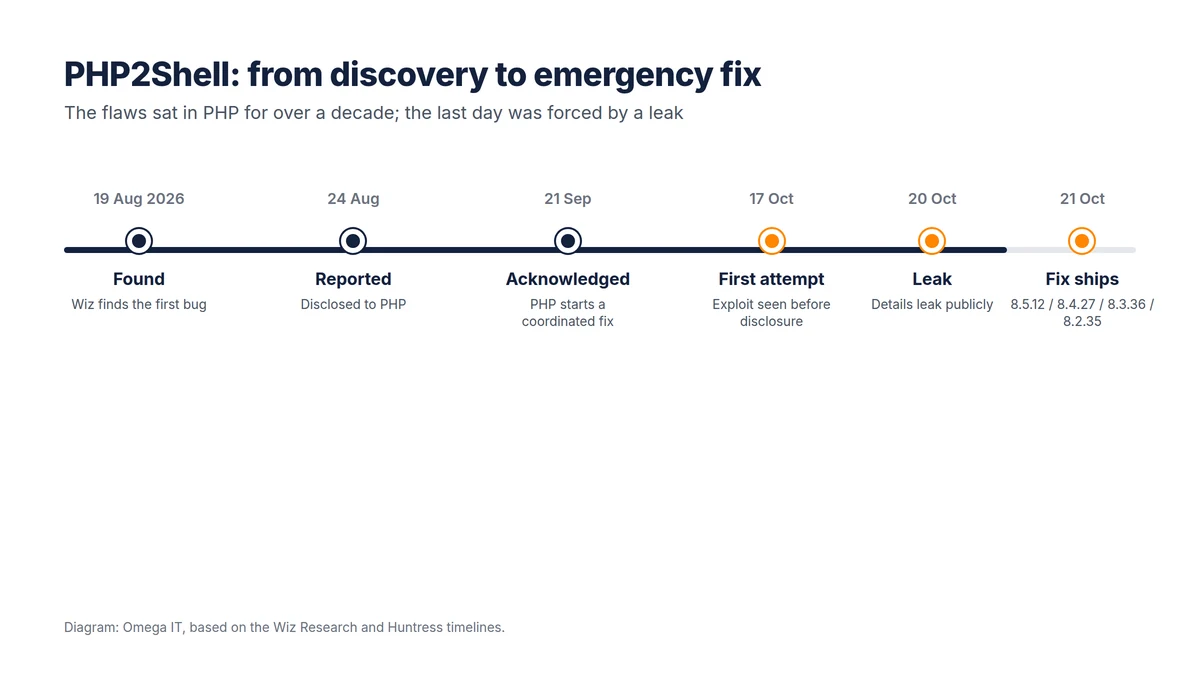
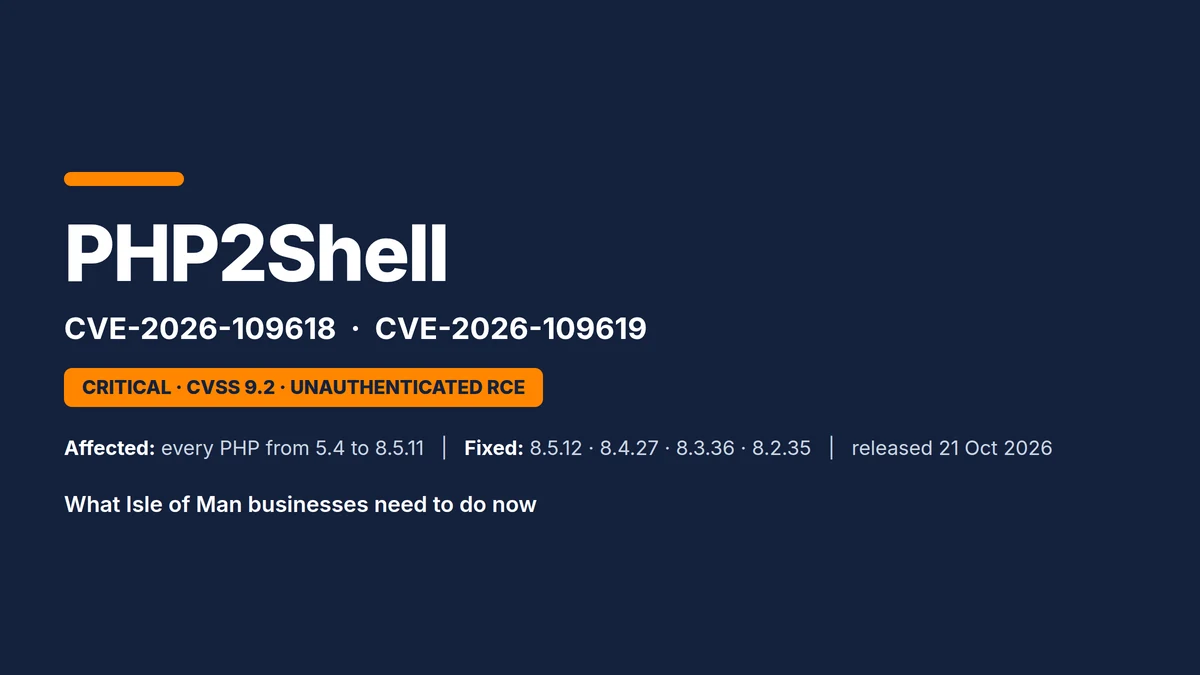
On 21 October 2026 the PHP project shipped an emergency fix for a pair of critical flaws nicknamed PHP2Shell, tracked as CVE-2026-109618 and CVE-2026-109619. They sit in the PHP engine itself, not in WordPress, Joomla or any plug-in, so almost every website and web application on the island that runs PHP is in scope until its server is patched. Both carry a CVSS v4.0 score of 9.2, the top "critical" band, and both allow an attacker with no password and no account to run commands on the server or read other people's data straight out of memory.
The Cyber Security Centre for the Isle of Man issued an urgent advisory the same day, and the flaws are already being exploited around the world. This guide explains, in plain terms for business owners and in detail for IT staff, what PHP2Shell is, whether it affects you, and exactly how to deal with it.
Are you affected? A plain-English answer
If your business has a website, an online shop, a customer portal or any web application, the honest starting assumption is yes, until your hosting provider or IT team confirms the server has been patched. PHP runs about seven in ten websites, so the question is rarely "do we use PHP" but "who looks after the server, and have they updated it".
Three points matter for a non-technical owner:
- Your own website code is not the problem. The flaw is in PHP, the engine underneath WordPress, Joomla, Drupal, Magento and bespoke sites alike. A perfectly maintained WordPress site on an unpatched server is still exposed.
- Updating WordPress or your plug-ins does not fix it. Only a patched version of PHP on the server fixes it, followed by a proper restart.
- An attacker needs nothing from you. No stolen password, no phishing, no click. They simply send web requests to your site.
What you should do today is ask one question of whoever runs your website: "Has our server's PHP been updated for PHP2Shell, CVE-2026-109618 and 109619, and has PHP been restarted?" If you host with an island provider or a UK platform, they may have patched already; get it in writing. If a member of staff or a freelancer runs a server for you, the technical section below is for them. If nobody can answer, treat it as urgent.
Where island businesses are most exposed
A few situations are common in Manx businesses and deserve a closer look:
- A WordPress or Joomla site on a cheap shared host. Shared hosting usually patches centrally, but you still need confirmation, and you should check the PHP version your site actually runs.
- A site or shop on a server you rent or own. Virtual servers from any provider are your responsibility to patch, not the data centre's.
- Old sites nobody maintains. A brochure site from years ago, still live, is often running a PHP version with no fix at all.
- PHP hidden inside other products. Hosting control panels, some vendor appliances and a few Windows applications bundle PHP without advertising it.
Why PHP2Shell is so serious
Most web attacks exploit a weakness in an application: a vulnerable plug-in, a weak password, a misconfigured form. PHP2Shell is different, and worse, for three reasons set out by the researchers at Wiz who found it:
- It is in the interpreter. Even a one-line "Hello World" script on a vulnerable PHP build is exposed, because the flaw is underneath all application code.
- It fires before your code runs. The weak spot is in how PHP starts handling a request, so logins, security plug-ins, CSRF checks and "maintenance mode" never get a chance to help.
- It leaves almost no trace. According to CrowdStrike, a successful attack returns an ordinary "200 OK", writes nothing unusual to the application log, and may leave only a single memory error in the web server log.
Wiz also makes the point that these bugs had been in PHP for over a decade, and that modern AI tooling is what made them practical to exploit. The CSC's wider message to island firms, in its recent annual threat reporting, is that preparedness, not threat level, is what decides the outcome.
The flaw explained for IT staff
Both CVEs come from one design pattern. PHP worker processes serve many requests over their lifetime. When a fatal error, usually hitting memory_limit, aborts a request part-way through, PHP frees that request's memory, but a global pointer into that memory can survive. The next request handled by the same worker then trusts the stale pointer before normal start-up resets it.
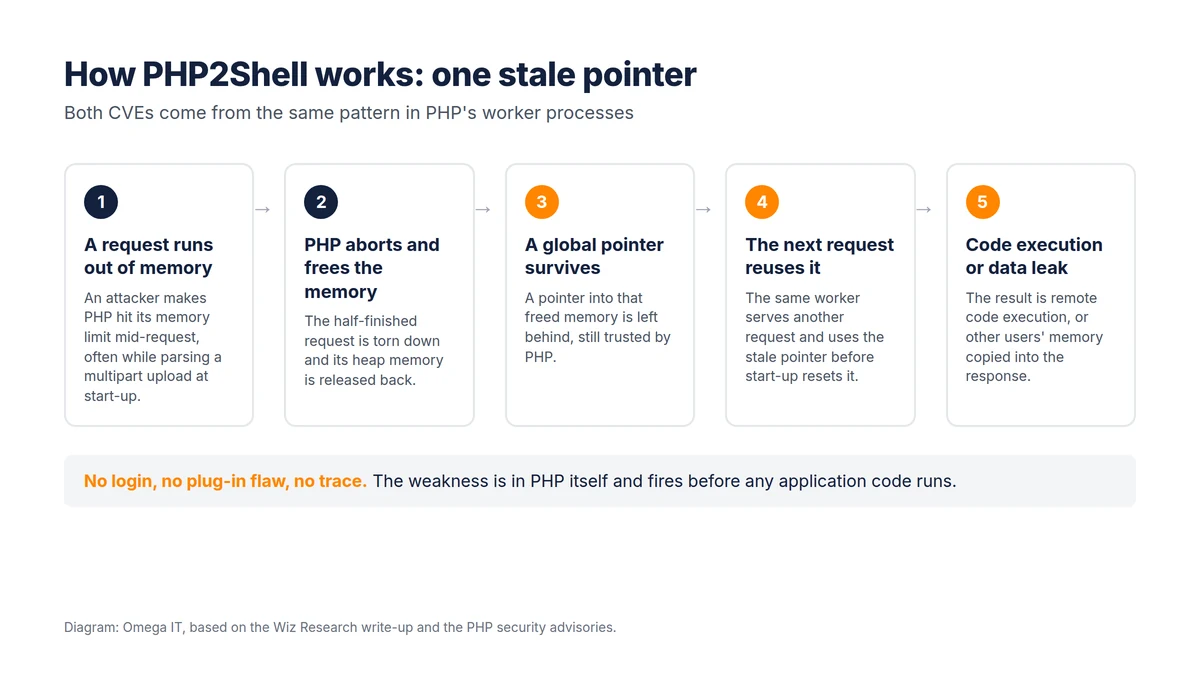
- CVE-2026-109618 (out-of-memory corruption): an out-of-memory error interrupts PHP while a request's data is only partly set up, and cleanup then treats that data as valid. Running out of memory while parsing multipart (file-upload) request bodies at start-up is one confirmed trigger; on Apache with mod_php, ordinary form posts can do it too.
- CVE-2026-109619 (stale global state): request-owned state outlives the memory behind it, and a later request on the same worker uses it first. Confirmed triggers include session upload-progress handling, fatal-error backtraces in PHP 8.5, and warnings from per-request ini settings.
Wiz demonstrated four working paths, including an upload-progress use-after-free giving pre-auth remote code execution on WordPress, Drupal and Joomla, and a memory-disclosure path that copies leftover memory into the PHPSESSID response cookie, exposing passwords, tokens, keys and certificates from other requests. The patched releases break the chain by replacing the abrupt out-of-memory abort with an orderly stop, and by resetting request state between requests. They also add a second, higher memory ceiling (memory_hard_limit_percent).
Which setups are most exposed
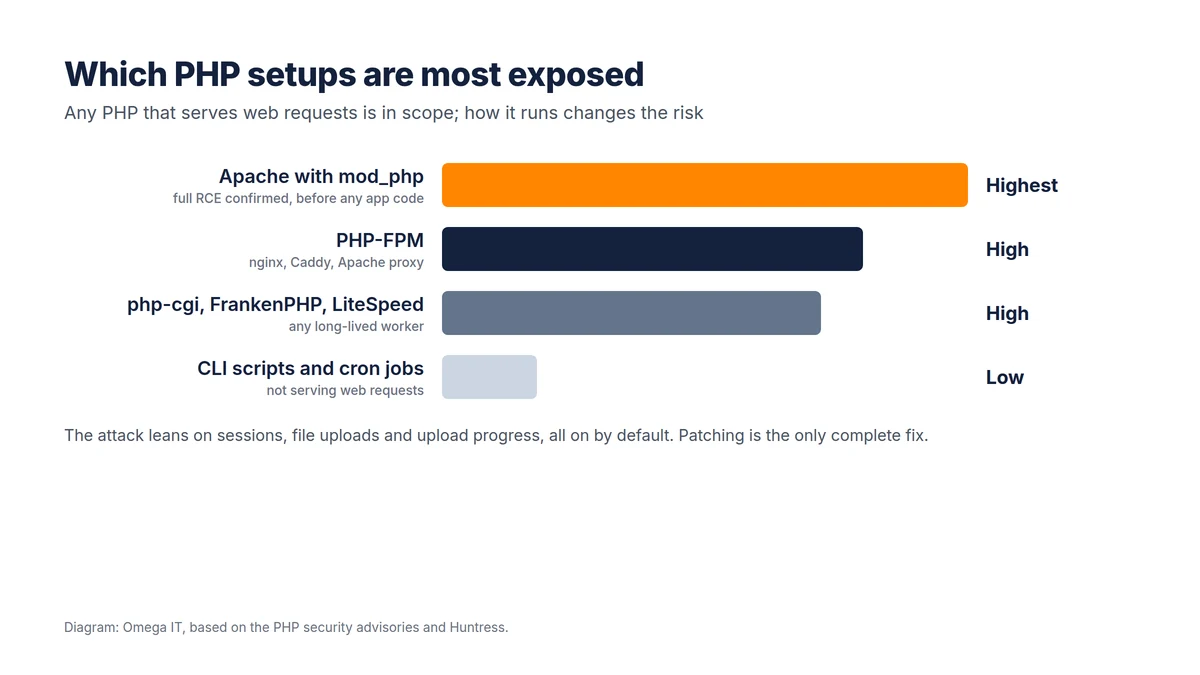
Any PHP that answers web requests is in scope, and the features the attack leans on (sessions, uploads, upload progress) are on by default.
- Apache with mod_php — highest. PHP confirmed full remote code execution over HTTP with default settings on a normal prefork setup, before any application code runs.
- PHP-FPM (nginx, Caddy, Apache proxy) — high. FPM kills a worker whose start-up fails, which blocks the mod_php path, but the upload-progress, app-triggered fatal error and OPcache paths still apply.
- php-cgi, FrankenPHP, LiteSpeed — high. Any long-lived worker can carry stale state between requests.
- CLI scripts and cron jobs — low. They do not serve web requests, so an outside attacker cannot reach them.
Patching: the only complete fix
PHP's own advisories are blunt: updating to a patched build is the only complete fix. The fixed branches are below. On the Isle of Man, most business servers run Ubuntu, Debian or a cPanel/CloudLinux host, all of which had packages on day one.
| PHP branch | First fixed release | Notes |
|---|---|---|
| 8.5 | 8.5.12 | Extra risk via the new fatal-error backtrace feature |
| 8.4 | 8.4.27 | Security support to 31 Dec 2028 |
| 8.3 | 8.3.36 | 8.3.35 is not fixed |
| 8.2 | 8.2.35 | Branch ends 31 Dec 2026; plan a move to 8.4 or 8.5 |
| 8.1, 8.0, 7.4 and older | no official php.net release | Rely on a distribution backport, or upgrade, isolate or take the site offline |
A trap to avoid: distribution builds keep their old version number. A patched Ubuntu 24.04 still reports PHP 8.3.6, so judge by the package version, never by php -v. The fixed Ubuntu 24.04 package is 8.3.6-0ubuntu0.24.04.13 (Ubuntu security notice USN-8948-1).
Step by step on an Ubuntu or Debian server
1. List every PHP install and where it comes from:
dpkg -l 'php*' | awk '/^ii/{print $2, $3}'2. Upgrade only the PHP packages (keep the quotes so the shell does not expand the *), swapping 8.3 for your branch:
sudo apt-get update
sudo apt-get install --only-upgrade 'php8.3*' libapache2-mod-php8.3
3. Restart PHP properly (see the table below). A graceful reload is not enough on mod_php.
4. Confirm the fix is installed. On Ubuntu and Debian the package changelog names the CVEs:
zgrep -E 'CVE-2026-10961[89]' /usr/share/doc/php8.3-common/changelog.Debian.gz5. Confirm nothing still runs the old binary in memory. Empty output is what you want:
sudo needrestart -b -r lOn a cPanel or CloudLinux host, update the ea-php and alt-php packages (patched builds were available for every version from ea-php52 to ea-php85), or ask your host to confirm they have done so.
Restart the right way
A running process keeps the old, vulnerable code in memory until it restarts, so the restart is not optional.
| How PHP runs | Restart command |
|---|---|
| Apache with mod_php | sudo systemctl restart apache2 (not reload, not graceful) |
| PHP-FPM | sudo systemctl restart php8.3-fpm (reload also works) |
| LiteSpeed / OpenLiteSpeed | Upgrade the lsphp packages, then sudo pkill lsphp |
| FrankenPHP | Install the new FrankenPHP release or image |
| Docker php images | Pull the new tag, rebuild with docker build --pull, recreate containers |
| Queue workers (e.g. Laravel) | Restart them, e.g. php artisan queue:restart |
If you genuinely cannot patch yet
No setting fully prevents either bug; the measures below only block paths PHP has confirmed, and have to be placed in php.ini, an FPM pool or the web server configuration, never via ini_set() or a .user.ini file, and then loaded with a full restart. Treat them as a stop-gap of hours, not weeks.
- Block multipart request bodies at the web server (breaks uploads on the paths you block).
- Turn off session upload progress:
session.upload_progress.enabled = 0. - On PHP 8.5 only, set
fatal_error_backtraces = 0. - On PHP-FPM,
pm.max_requests = 1stops a worker carrying state into the next request. - Set
memory_limit = -1administratively (and cap memory with a container or cgroup instead).
; /etc/php/8.3/fpm/conf.d/99-php2shell.ini
session.upload_progress.enabled = 0# Apache 2.4, in each PHP vhost
<If "req('Content-Type') =~ /multipart/i">
Require all denied
</If>Things that do not help: hiding errors, turning off file_uploads (PHP still parses the body), application logins or security plug-ins (the attack runs first), and a CDN or firewall while the origin IP is still reachable directly. For PHP 8.1 and older with no distribution fix, keep every mitigation in place and move to 8.4 or 8.5; taking the site offline is the only fully safe option until then.